Redundancy doesn't scale down. So rent it instead of buying it.
A twenty-VM company needs the same redundant architecture as a two-hundred-VM company: multiple hosts, shared storage that isn't a single point of failure, a second site, and someone whose job it is to watch all of it. Those minimums don't shrink to fit your environment, which is exactly why buying them rarely makes sense at this size. HVENS is that infrastructure as a monthly service, run by the engineers who built it.
The problem isn't the servers. It's everything around them.
Small environments almost never fail because someone bought the wrong server. They fail because the second server, the redundant storage, the second site, the tested restore, and the person on call were all line items that got cut when the quote came back. That isn't negligence, it's arithmetic: the fixed cost of doing infrastructure properly is spread across very few workloads, so the per-VM number looks absurd and the redundancy gets dropped. The gap only becomes visible the day a power supply fails.
You can't buy a fifth of a cluster
Surviving the loss of a host means at least three hosts, so one can fail while another is patching. Surviving the loss of a disk shelf means shared storage that is itself redundant. Surviving the loss of a building means a second building. None of those minimums get smaller because you only have twenty VMs to put on them.
The hardware is the cheap part
The server is a purchase order. The rest is a program: firmware and hypervisor patching, spares on a shelf, UPS batteries that need replacing, cooling, a monitored alerting path, and a restore you have actually tested rather than assumed. That work does not scale down either, and it competes with everything else your team was hired to do.
Refresh day arrives regardless
Warranties run out around year five, parts get harder to source, and the whole conversation restarts from zero with a new capital request. Renting moves that from a periodic capital event you have to defend to a monthly cost that stays flat, and the hardware generation underneath you becomes our problem to keep current.
Every line below is something you'd otherwise buy, house, patch, and replace.
This is the honest shape of the comparison. It isn't that hosting is magically cheaper per gigahertz, because sometimes it isn't. It's that a redundant on-premise build for a small environment requires nearly all of the following before it is genuinely reliable, and at this scale the full list rarely survives the budget. Renting collapses the whole column into one monthly line with the redundancy already present.
The one thing renting does not remove is owning your applications. Somebody still needs to care about what runs inside the VMs. What disappears is the layer underneath them, which is the layer that is expensive to do properly and unforgiving when it is done cheaply.
What stays yours, what stops being yours
Ten to fifty VMs is the sweet spot. We'll tell you if you're outside it.
That range is large enough that a single server is no longer a responsible place to put the business, and small enough that a properly redundant build costs more per workload than renting the same capability. Outside it, the answer changes, and we would rather say so early than sell you something that fits us better than it fits you.
Under about 10 VMs
You may genuinely be fine on one well-specified server with backups that are tested, or on Microsoft 365 if what you actually have is a file server and some shared folders. Talk to us anyway if uptime matters more than the VM count suggests, or if that single server is the thing keeping you up at night. If it turns out you need less than we sell, we would rather tell you that early than quote you for it.
Roughly 10 to 50 VMs
This is the range this page is written for. Domain controllers, file servers, a session host or two, a database, a handful of application servers, and the line-of-business software your staff open every morning. Enough that redundancy is not optional, not enough that buying redundancy makes sense. Almost always a clear win.
Above 50 to 100 VMs
The fixed costs start spreading across enough workloads that owning can win, especially if the load is steady and you already have staff and space. We will say so, and we run that side too: Richweb does managed Proxmox on hardware you own, and hybrid arrangements where some of the estate stays on-premise.
Signs this is the right conversation
- Your production runs on one host, or on two with no shared storage.
- Your offsite copy is a rotated drive, or there isn't one yet.
- Your restore process has not been tested against a real failure.
- Hardware is past warranty and the replacement quote is a real number.
- A day of downtime would cost meaningfully more than a year of hosting.
- Nobody on staff wants to own firmware, UPS batteries, and disk failures.
Reasons to stay on-premise, honestly
- A workload that needs local hardware, a licence dongle, or a machine on a factory floor.
- Data volumes so large that moving them is the whole project.
- An application vendor who will only support it on hardware you own.
- Bandwidth at your site that cannot carry your users to a remote environment.
- A recent hardware investment that has not earned its keep yet.
Any of these can also be a hybrid rather than a no. See the on-prem catalog.

What "reliable" actually means on our side.
Reliability claims are cheap, so here is the substance behind ours. You buy compute, RAM, and storage as monthly pools rather than picking from an instance-type catalog, then build and resize VMs inside those pools without renegotiating anything.
Two regions, genuinely separate
Ashland, Virginia is primary and Denton, Maryland is the paired DR region, roughly 150 miles east on a separate power grid and a separate fiber path.
Why that matters
Both are carrier-neutral. Separation only counts if a single event cannot take out both, which is why the grid and the fiber matter more than the mileage.
Offsite backup by default
Protected VMs are backed up through Proxmox Backup Server and those backups replicate to the second region, billed per GB of backup data.
What that saves you
There is nothing to design and no second facility to fund for your data to have an offsite copy, which is usually the hardest piece to justify as a line item when you are building it yourself. It is one per-GB line rather than a DR project.
Recovery you choose per workload
When a specific workload has to come back fast, Warm DR reserves compute, RAM, and storage in the second region at half the primary rate.
What's included
A written recovery runbook, built with you. Chosen per pool, so only the workloads that genuinely cannot wait carry the cost.
Performance tiers, chosen independently
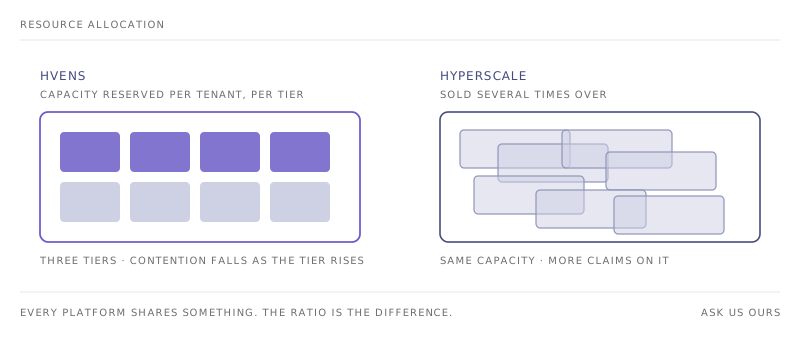
Bronze, Silver, and Gold differ in hardware generation and performance headroom, with contention falling as the tier rises. Compute tier and storage tier are picked separately.
What that lets you do
A storage-heavy file server is not forced onto expensive compute, and the SQL box can sit on Gold while the domain controllers do not.
Storage matched to the job
ZFS on spinning disk for bulk and archival, Blockbridge NVMe where latency actually matters.
How it behaves
Block volumes behave like physical disks, so you format, partition, and manage them at the OS level exactly as you do now.
Your network, your choice of edge
Keep your own firewall with dedicated internet access and a routed block behind it, or hand us NAT, packet filtering, and site-to-site IPsec on our managed OpenBSD gateway.
Underneath
Tenant separation runs on an EVPN fabric, and traffic between your own VMs is not metered.
The workloads a small business actually runs
None of this is exotic. It is the set of systems that quietly runs a company of forty or four hundred people, and it is what we host every day.
- Windows Server. Active Directory domain controllers, file and print, RDS and session hosts, and general application servers. Bring your own licences or take Windows Server, RDS CALs, and SQL Server monthly per VM under SPLA, with no Microsoft agreement of your own.
- Databases. SQL Server and the open-source engines, on NVMe-backed storage when the workload is latency-sensitive rather than just large.
- Line-of-business applications. QuickBooks, Sage, and the industry-specific software your staff rely on all day and notice immediately when it is slow.
- Linux. Ubuntu, Debian, Rocky, AlmaLinux. Application hosting, reverse proxies, internal tooling, whatever the stack looks like.
- Remote desktops. Session hosts with enough network headroom that remote staff do not notice they are on a VM in another city.
- Backup and DR targets. Offsite Veeam, Datto, or Proxmox Backup Server targets, fiber-connected and offsite by default.
You don't have to move production first
The nervous part of this decision is not the destination, it is the transition. So most customers do not start there. The usual first step is sending your existing backups to us as an offsite target. It solves a problem you already have, it is a small commitment, and it proves the recovery path with real data before a single workload moves.
- Send us your backups. Your on-premise environment keeps running exactly as it does today. We become your offsite copy, and you find out what restoring from us actually feels like before anything depends on it.
- Move something that doesn't matter much. A test box, an internal tool, a secondary domain controller. Real workload, low stakes, and a rollback plan that is simply leaving the original where it is.
- Move the rest in waves. Groups you approve, validated one at a time. Networking and storage take the planning; the VMs themselves are usually the straightforward part. Nobody cuts over on a Friday night.
- Decide what stays. Plenty of environments end up deliberately hybrid, with something on-premise for a good reason and everything else with us. Site-to-site IPsec or a private layer 2 handoff keeps that working indefinitely.
Flat monthly, sized to what you actually run.
You buy capacity rather than instances, then build and resize VMs inside it without renegotiating anything. That structure is usually the part that differs from what people expect, so it is worth setting out plainly.
How it's built
- Compute, RAM, and block storage sold as monthly pools by tier, not per-instance.
- Compute tier and storage tier chosen independently per workload.
- Bandwidth as a committed monthly rate.
- Microsoft licensing per VM if you want it, or bring your own.
- Warm DR priced at half the primary rate, per pool, only where you need it.
- Month to month, no minimum commitment to start.
What isn't on the invoice
- No egress fees. Bandwidth is committed, not metered per gigabyte.
- No per-second billing and no reserved-instance math to optimize.
- No charge for traffic between your own VMs.
- No separate professional-services line for Warm DR recovery planning.
- No capital purchase, and no hardware refresh in year five.
Tell us what you are running and we will come back with a quote, typically within a day. That conversation costs nothing and you get a number you can compare against a hardware quote.
Small environments get treated like small accounts. That's the real complaint.
The usual experience of being a modest customer of a large provider is a ticket queue, a support tier you have to pay to escalate past, and an account manager who cannot answer a technical question. Richweb has run infrastructure for other businesses since 1995 and is family and employee owned, with no private equity and no exit thesis. We are not optimizing for an acquisition that reprices you in three years.
You reach engineers
Your escalation path is the team that operates the hypervisors and the network, not a first-line script reader who has to file a ticket to reach someone able to change something. We have carried customers for ten, fifteen, and twenty years, which is a harder claim to make than any figure on a datasheet.
We run what we sell
HVENS runs on Proxmox VE in production and Richweb is a Gold-level Proxmox Partner with direct escalation into Proxmox engineering. The people who would handle your migration are the same ones operating the platform the rest of the week.
Audited and US-based
SOC 2 Type II, which your insurer or your largest customer will eventually ask about. Two carrier-neutral mid-Atlantic facilities in Ashland, Virginia and Denton, Maryland. Your data stays in the United States.
Coming off a VMware renewal?
If the trigger for this conversation is a Broadcom renewal rather than aging hardware, there is a page written specifically for that path, including what changes inside your VMs and how the migration is staged around a fixed renewal date.
Managing IT for other companies?
If you are an MSP or an IT consultancy with clients in this position rather than an environment of your own, there is a partner program behind this: tiered discounts, white-label, consolidated billing, and a client-facing console you can put your own brand on.
Common questions
Eight questions we get on nearly every first call. Open any of them.
How many VMs do you need to run for this to make sense?
Roughly 10 to 50 is where the economics are clearest. Large enough that a single server is no longer a responsible place to put the business, small enough that a properly redundant on-premise build costs more per workload than renting the same thing. Below about 10 you may be fine on one well-backed-up server. Above 50 to 100, owning starts to amortize and we will tell you so.
Why is buying hardware harder for a small environment?
Because redundancy is indivisible. Surviving the loss of a host means at least three hosts. Surviving the loss of a disk shelf means redundant shared storage. Surviving the loss of a building means a second site. Those minimums are identical whether you run 20 VMs or 200, so the cost per workload is far worse at small scale.
What actually runs on HVENS?
Active Directory domain controllers, file and print servers, RDS and session hosts, SQL Server, Linux application servers, and line-of-business applications like QuickBooks and Sage. Windows Server and Linux both run as ordinary virtual machines.
Do we need our own IT staff to use this?
You need someone who owns your applications, but not someone who owns hypervisors, firmware, and disk replacements. We operate the platform, the storage, and the network. If you have no internal IT at all, Richweb's managed IT practice can cover the layer above the infrastructure as a separate engagement.
What happens to backups and disaster recovery?
Backups run through Proxmox Backup Server and replicate to our second region, so every protected VM disk has an offsite copy without you designing anything. They are on by default and billed per GB of backup data. If a workload also needs a committed recovery time, Warm DR reserves capacity in the second region and includes a written runbook, chosen per workload rather than for everything.
Do you charge egress fees?
No. Bandwidth is a committed monthly rate rather than metered per gigabyte, so the invoice does not move because of how much data your applications served this month. No per-second billing and no reserved-instance math either.
Where does our data live?
Ashland, Virginia is primary and Denton, Maryland is the paired DR region, roughly 150 miles east on a separate power grid and separate fiber path. Both carrier-neutral. Everything stays in the United States.
What if we are not ready to move everything?
Most customers do not start with production. A common first step is sending your existing backups to us as an offsite target, which solves a problem you already have and proves the recovery path before any workload moves. Site-to-site IPsec or a private layer 2 handoff keeps a hybrid environment working for as long as you need one.
They initially stepped in to resolve a complex and frustrating networking issue, and their expertise truly saved the day. Since then, they’ve continued to support us with a range of services, including private cloud solutions and assistance with Office 365 and Active Directory.